Modules (BinloopX)
The Modules tab allows you to configure which BinloopX modules are installed and configure them as needed, as shown in Figure 1.
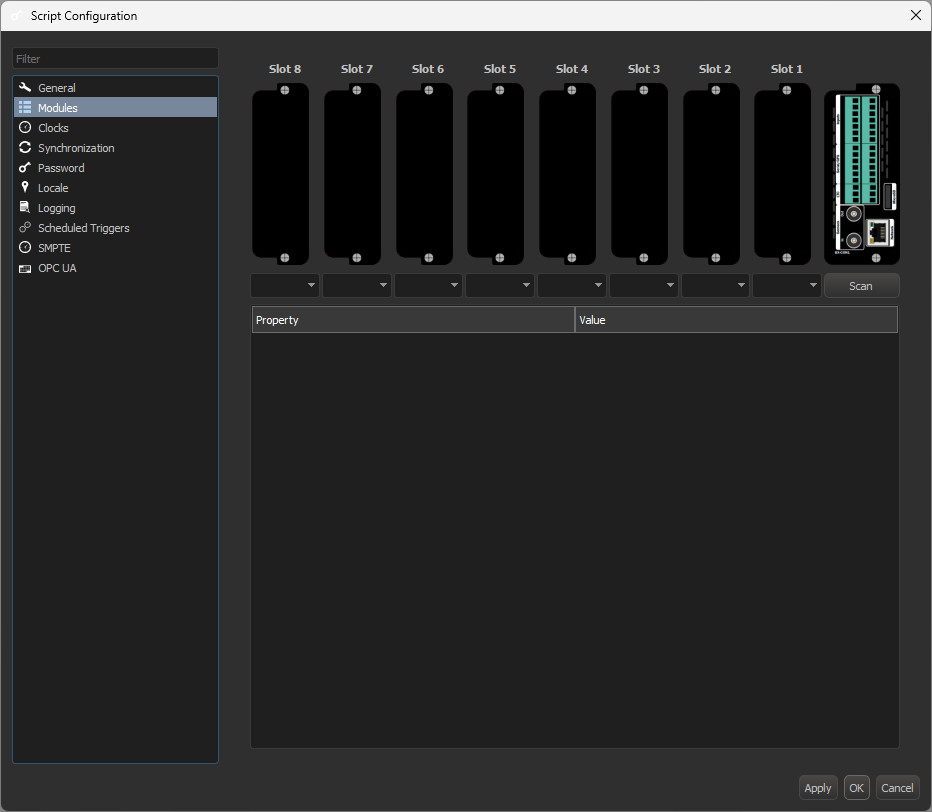
Module types can be specified manually using the drop-down menus beneath each slot, or select Scan to connect to a BinloopX on your network and use that module layout.
Once you've configured your module types, you can configure each individual module below.
BX-16A Options
The BX-16A is our audio output module for the BinloopX.
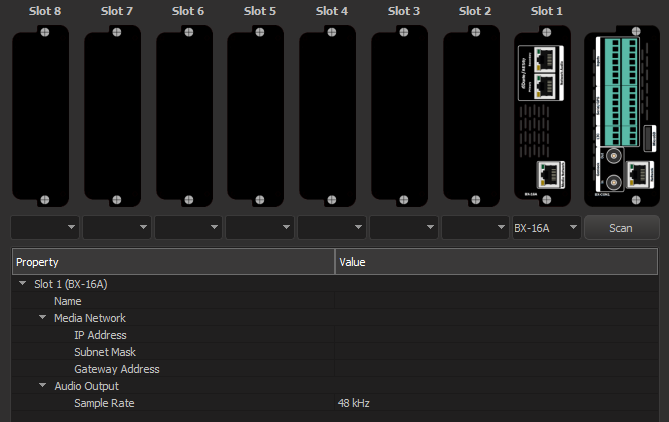
- Name: this name will be displayed on the module display located on the front of the BinloopX
- Media Network: these properties configure the Media Network Ethernet port on the back of the BX-16A module. This port should be used when faster media transfer speeds are desired.
- Audio Output/Sample Rate: this property selects the sample rate at which the BX-16A plays audio from either 44 kHz or 48 kHz. It should match your audio content. If this setting differs from the sample rate of your audio network, the module will automatically convert between the two sample rates.
BX-4KU Options
The BX-4KU is our video output module for the BinloopX.
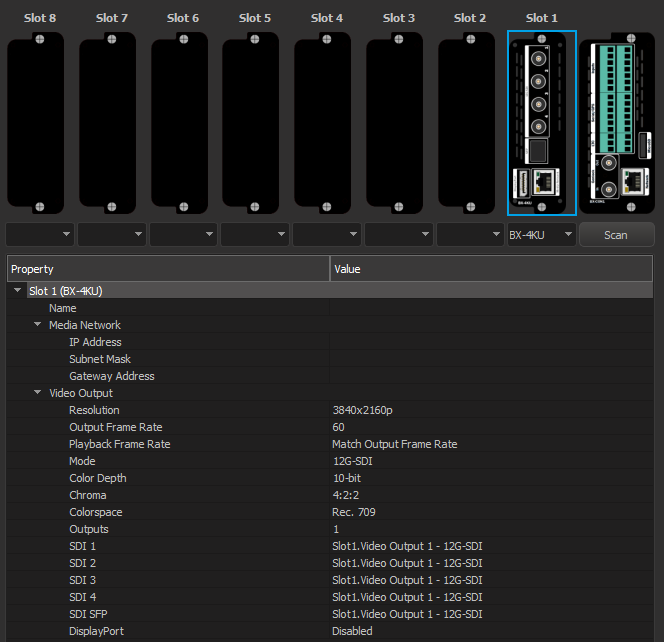
- Name: the module name will be displayed on the module display located on the front of the BinloopX
- Media Network: these properties configure the Media Network Ethernet port on the back of the BX-4KU module. This port should be used when faster media transfer speeds are desired.
Video Output
- Resolution: select the output resolution of the BX-4KU module from 1080p, 2048x1080p, 3840x2160p, 4096x2160p, or Custom
- When set to 2048x1080p or 1080p, there are 4 independent Video Outputs (imagine 4 separate players, each with stop/play/pause control).
- For 2160p or higher resolution, there is a single Video Output.
- When set to Custom, you may specify a custom resolution and video timing standard and there is a single Video Output (DisplayPort),
- If your media content stored on the BX-4KU does not match the output resolution, it will be scaled to match.
- Width: available when Resolution is set to Custom. Valid widths range from 480 to 4096 pixels. Widths must be divisible by 8.
- Height: available when Resolution is set to Custom. Valid heights range from 480 to 2160 lines.
- Video Timing: available when Resolution is set to Custom. The video timing standard can be selected for display compatibility. The default value is "CVT Reduced Blanking v2". The "CVT" and "CVT Reduced Blanking" may improve compatibility with older display devices, but at some resolutions deviate from standard framerates (ie 60.01 Hz vs 60 Hz), leading to inadequate Genlock.
- Output Frame Rate: this determines the rate at which the image sequence plays through the outputs. Select from the following frame rates: 23.976, 24, 25, 29.97, 30, 47.952, 48, 50, 59.94, 60.
-
Playback Frame Rate: this determmines the media playback frame rate. If different than the output frame rate, the BX-4KU will work its magic to handle it.
Example
If the output frame rate is set to 60 FPS and the playback frame rate is set to 30 FPS, the BX-4KU will double each frame in the media and essentially play the media at 2x speed.
If the reverse was true, and the output frame rate is set to 30 FPS and the playback frame rate is set to 60 FPS, the BX-4KU will throw away every other frame in the media and essentially play the media at half speed.
- Match output frame rate: sets the playback frame rate to the output frame rate
- Match clip frame rate: sets the playback frame rate to the frame rate of the media
- Force selected fps: sets the playback frame rate to a specific frame rate
-
Mode: This option determines the active Video Outputs on the BX-4KU. You can choose between various SDI modes and DisplayPort. The available SDI modes depend on the chosen resolution and frame rate. For instance, 4K60 output has the option of 12G SDI or Quad-link 3G SDI modes. SDI and DisplayPort modes cannot be active at the same time.
- Color Depth: For DisplayPort output modes, you can choose between 8-bit or 10-bit output. SDI is always 10-bit. If your media color depth does not match the output color depth, it will be automatically converted.
- Chroma: For DisplayPort output modes, you can choose between 4:2:2 and 4:4:4 output chroma. SDI is always 4:2:2 chroma. If your media chroma does not match the output chroma, it will be automatically converted.
- Colorspace: Choose between Rec.709 and Rec.2020 colorspace output. Media should be encoded with the same colorspace as this setting for color accuracy.
- SDI 1/2/3/4/SFP: These fields show you what signal is on each of the physical SDI connectors on the BX-4KU, and for output resolutions that allow multiple Video Outputs (like 1080p), these fields allow you to choose which output is assigned to which physical SDI connector.
- By default, Output 1 is assigned to SDI 1 and so on, but you may mix these around or have the same Video Output on multiple SDI outputs if you'd like.
- If these fields show "Disabled", you have chosen a DisplayPort output mode and SDI is not active.
- The SDI SFP output is always a copy of the Copper SDI 1 output.
- DisplayPort: This field shows which Video Output is assigned to the DisplayPort connector. If this shows "Disabled", you have chosen an SDI output mode and DisplayPort is not active.