Buttons
Some show controllers have push buttons on the device's front panel. For example, a V16X has 16 buttons. Those buttons are available as WinScript Live resources and can be used for sequence triggers or as boolean variables in expressions.
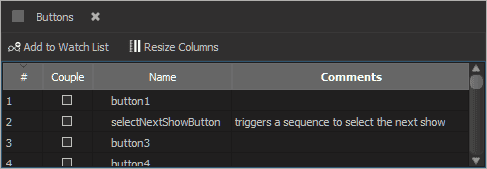
Buttons are displayed in a grid view pre-populated with button resources. The number of buttons available depends on the show controller selected in the script configuration.
Couple
Checking "Couple" links a front-panel button to its corresponding discrete input. For example, if "Button1" is coupled, pressing Button 1 has the same effect as a pulse on Input 1 (and vice versa). This is useful for testing input behavior without electrically triggering the discrete input.
Name
By default, the buttons are named "Button1", "Button2", and so on - but you can rename them whatever you'd like. For example, "StartShowButton".