General
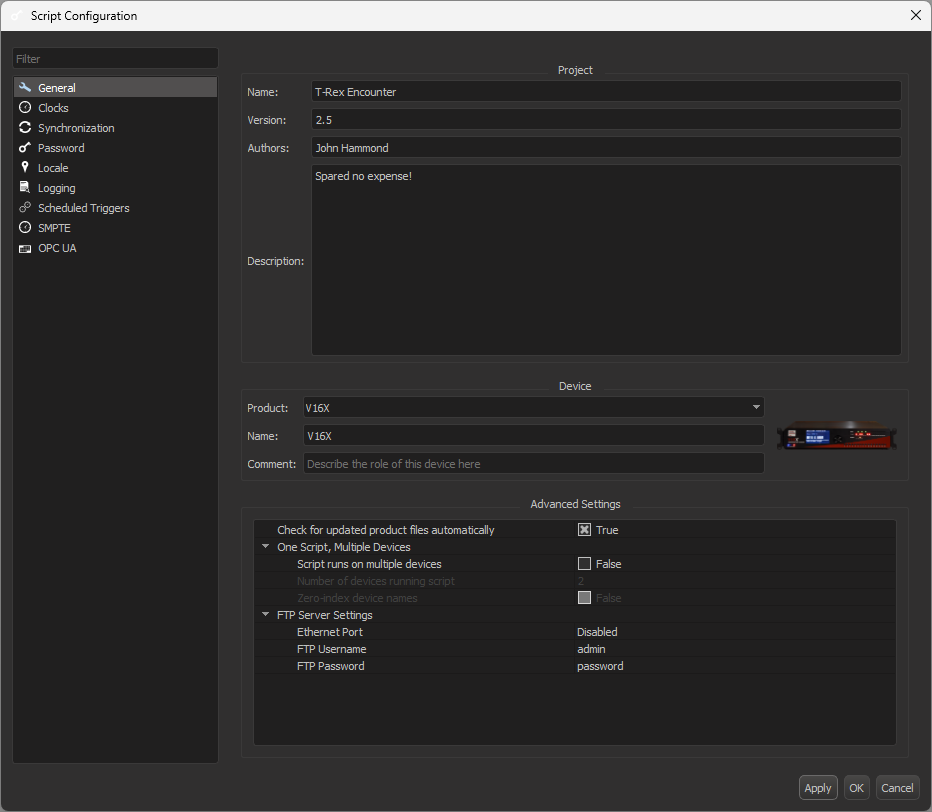
When you start a new Script, the first dialog you see will be the Script Configuration dialog, as shown in Figure 1. You can access this dialog at any time by selecting Configuration > Script from the WinScript Live menu bar. This dialog is the home of all of your script settings, including product type, BinloopX modules, clock settings, timezone, and more.
!!! note The available options and sections depend on the type of device configured in the General tab.
Project
The Name, Version, Authors, and Description fields are stored in the script file for reference. They have no functional effect on the script.
Device
The Product drop-down is the first thing that you should set when creating a new script. This tells WinScript Live which device you are creating a script for, allowing script resources to populate appropriately.
The Name field is used as the primary device name in your script. The device name specified here must match the device name assigned to the hardware before your script can be run. This can be changed at any time.
The Comment field is for your own note-keeping, and has no functional effect on the script.
Advanced Settings
This section holds miscellaneous script settings, including FTP, product file updates, and fleet management.
- Check for updated product files automatically: when selected, WinScript Live will prompt you with a dialog about any updated product files at startup
One Script, Multiple Devices
This feature allows you to configure a script to run on multiple devices, for fleet applications.
- Script runs on multiple devices: select this option to enable this feature
- Number of devices running script: define how many devices will be running the script
- Zero-index device names: when selected, the array of device names will begin with 0 instead of 1
FTP Server Settings
- Support Ethernet Port: select which port to enable the FTP server
- Username: set the username, default is admin
- Password: set the password, default is password