About ShowTouch
ShowTouch software is installed with WinScript Live. Access it from your Windows Start Menu or MacOS Applications menu. You can also launch it from within WinScript Live by selecting Tools -> ShowTouch on the menu.
ShowTouch is able to load panels directly from the controller running your script. Multiple ShowTouch connections can be made to each controller for distributed control and for display of different interfaces or logs.
Hardware
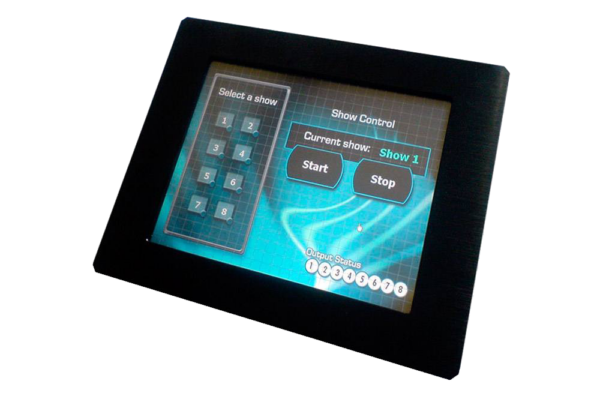
Alcorn McBride offers several ShowTouch hardware models. For example, the ShowTouch 10" is a touch-screen enabled Panel PC that can be mounted in a rack, on a wall, or on a desktop-stand.
iOS
The ShowTouch iOS app works on iPhone and iPad devices. Download from the Apple App Store.
PC
ShowTouch can run on any Windows or MacOS computer. It will automatically remember the settings used to connect to your desired panel.

Multiple Panels
It's possible to connect to multiple panels by using a command-line option. Follow these steps to assign a unique name to each ShowTouch instance:
- Create a new shortcut to ShowTouch
- Edit the shortcut to add "/name=uniqueName"
For example, to run 2 unique instances of ShowTouch on a Windows PC the shortcuts could be:
- "C:\Program Files\Alcorn McBride Inc\WinScript Live 6\ShowTouch>ShowTouch.exe" /name=showTouch1
- "C:\Program Files\Alcorn McBride Inc\WinScript Live 6\ShowTouch>ShowTouch.exe" /name=showTouch2
Drawings
ShowTouch 7
| Drawing | Type | Size |
|---|---|---|
| ShowTouch 7 Dimensional Drawing | 322.1 KB | |
| ShowTouch 7 Dimensional Drawing | STEP | 7.2 MB |
| ShowTouch 7 Dimensional Drawing (Rack Mount) | 480.1 KB | |
| ShowTouch 7 Dimensional Drawing (Rack Mount) | STEP | 69.7 KB |
| ShowTouch 7 Dimensional Drawing (Wall Mount) | 397.5 KB | |
| ShowTouch 7 Dimensional Drawing (Wall Mount) | STEP | 2.8 MB |
ShowTouch 10
| Drawing | Type | Size |
|---|---|---|
| ShowTouch 10 Dimensional Drawing | 328.1 KB | |
| ShowTouch 10 Dimensional Drawing | STEP | 12.4 MB |
| ShowTouch 10 Dimensional Drawing (Rack Mount) | DWG | 174.7 KB |
| ShowTouch 10 Dimensional Drawing (Rack Mount) | 475.8 KB | |
| ShowTouch 10 Dimensional Drawing (Rack Mount) | STEP | 405.3 KB |
| ShowTouch 10 Dimensional Drawing (Wall Mount) | DWG | 532.9 KB |
| ShowTouch 10 Dimensional Drawing (Wall Mount) | 338.0 KB | |
| ShowTouch 10 Dimensional Drawing (Wall Mount) | STEP | 4.9 MB |
| ShowTouch 10 Dimensional Drawing (Swivel Mount) | DWG | 88.2 KB |
| ShowTouch 10 Dimensional Drawing (Swivel Mount) | 182.2 KB | |
| ShowTouch 10 Dimensional Drawing (Swivel Mount) | STEP | 463.7 KB |
ShowTouch 17
| Drawing | Type | Size |
|---|---|---|
| ShowTouch 17 Dimensional Drawing | 306.9 KB | |
| ShowTouch 17 Dimensional Drawing | STEP | 9.7 MB |
| ShowTouch 17 Dimensional Drawing (Rack Mount) | 872.9 KB | |
| ShowTouch 17 Dimensional Drawing (Rack Mount) | STEP | 112.9 KB |