Inputs
An input is a WinScript Live resource tied to a physical hardware input. Some controllers have user programmable inputs located on the controller's rear connectors. For example, the V16X has 16 inputs. More inputs can be added using remote devices.
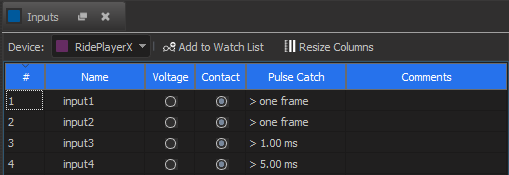
Inputs are displayed in a pre-populated grid view based on the selected device.
Name
An input name can be any valid resource name. The name is typically used in sequence triggers, but may act as a read-only boolean variable in expressions as well.
Voltage / Contact
Some controllers with integrated inputs can be configured for either voltage or contact closure mode. In voltage mode, the controller monitors the input for high or low voltage. In contact closure mode, the controller provides enough power to the input that it can detect when the circuit is open and closed.
Pulse Catch
The Pulse Catch feature sets the minimum amount of time an input must be held stable for it to be detected. RidePlayerX can be configured to "catch" trigger pulses shorter than the length of one frame. For other controllers, inputs must be held for at least one frame to ensure triggering occurs. If the controller supports Pulse Catch, this column will be enabled and you may choose the shortest pulse width that you wish to accept as a valid trigger. Pulse Catch options are as follows:
| Pulse Catch Options |
|---|
| > 1 frame |
| > 0.10 ms |
| > 0.25 ms |
| > 0.50 ms |
| > 0.75 ms |
| > 1.00 ms |
| > 5.00 ms |
| > 10.0 ms |
| > 20.0 ms |
| > 30.0 ms |
| > 40.0 ms |
| > 50.0 ms |
Note
The controller requires up to one frame duration to act on any input trigger. Therefore, while Pulse Catch will allow you to detect and act on triggers that are significantly shorter than one frame long, an input trigger cannot be processed more than once per frame.
Modbus TCP
Modbus TCP is a standard protocol used for many IO device modules. More information is found here.